
Jetzt im App Store · Android in der Testphase
Now in the App Store · Android in beta
MTB SendLab
Sprünge, Kurven, Strecken und Bikepark-Runs messen – mit dem Smartphone in der Tasche, iPhone oder Android.
Measure jumps, corners, trails and bike park runs – with the phone in your pocket, iPhone or Android.
- Gemessen wird am Fahrer – nichts wird am Bike montiert.
- Airtime, Sprungweite, Anlieger, Höhenmeter, Abfahrten und Pumptrack-Runden.
- Streckenkarte mit Zeitnahme, Challenges und eine Garage für deine Bikes.
- Neu: warnt dich unterwegs vor Gefahrenstellen – Handy bleibt in der Tasche.
- Measured at the rider – nothing is mounted on the bike.
- Airtime, jump distance, berms, elevation gain, descents and pump track laps.
- Trail map with timing, challenges and a garage for your bikes.
- New: warns you about hazards on the trail – your phone stays in your pocket.
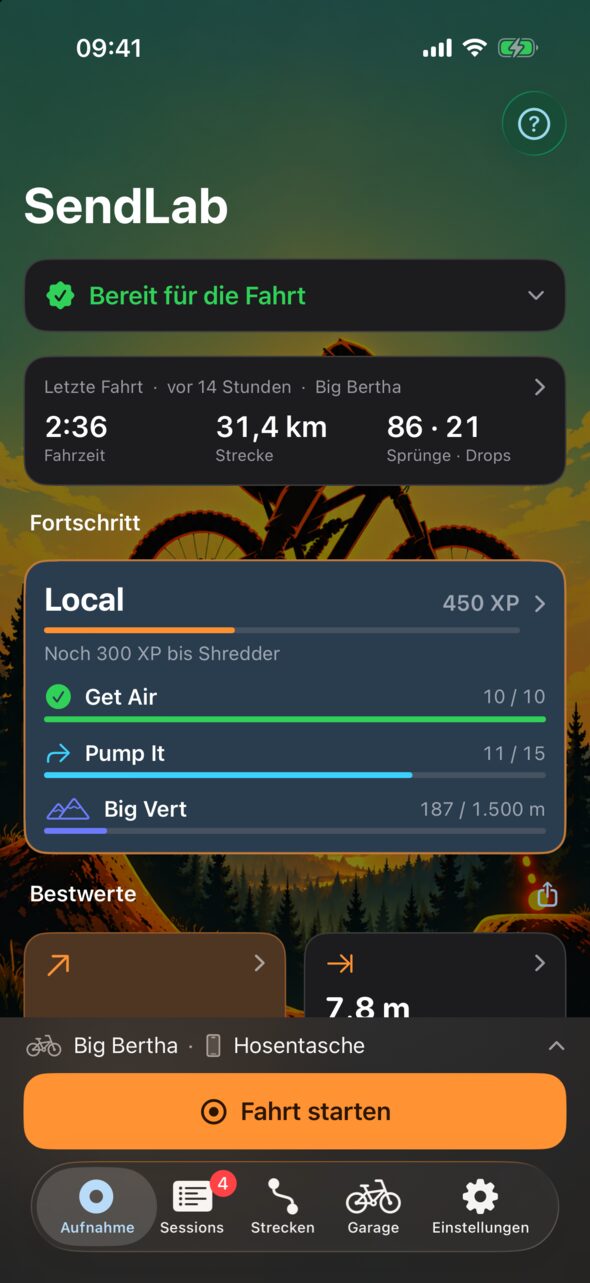

SendLab in einer Minute
SendLab in one minute
Neu in SendLab
New in SendLab
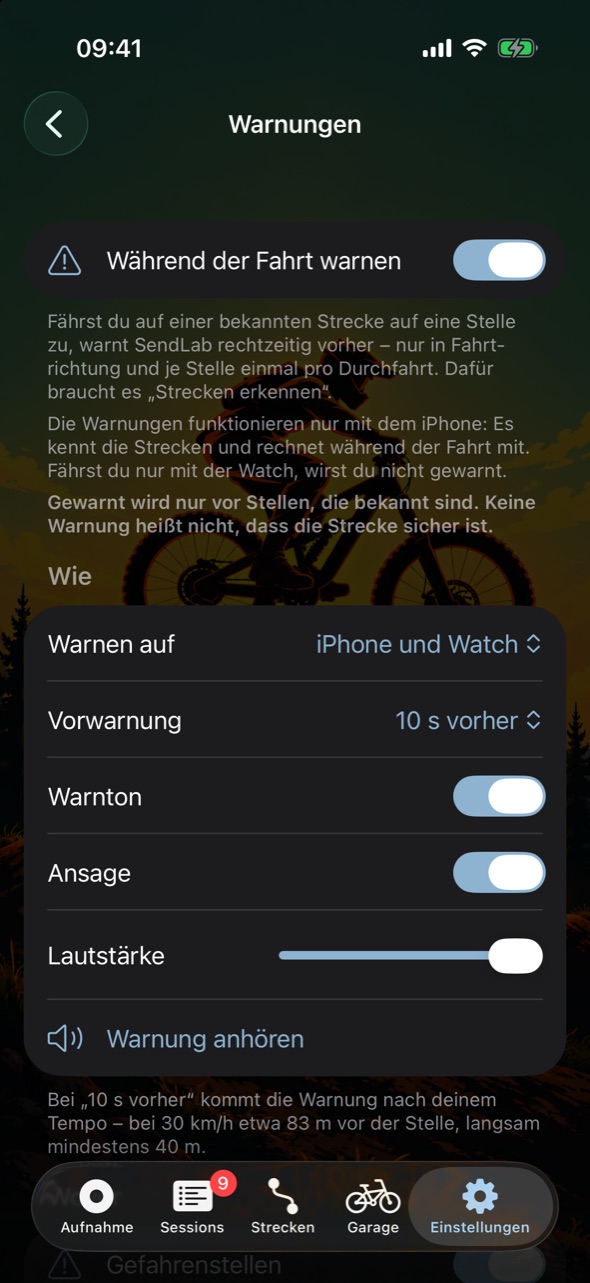
Gewarnt, bevor du dort bist
Warned before you get there
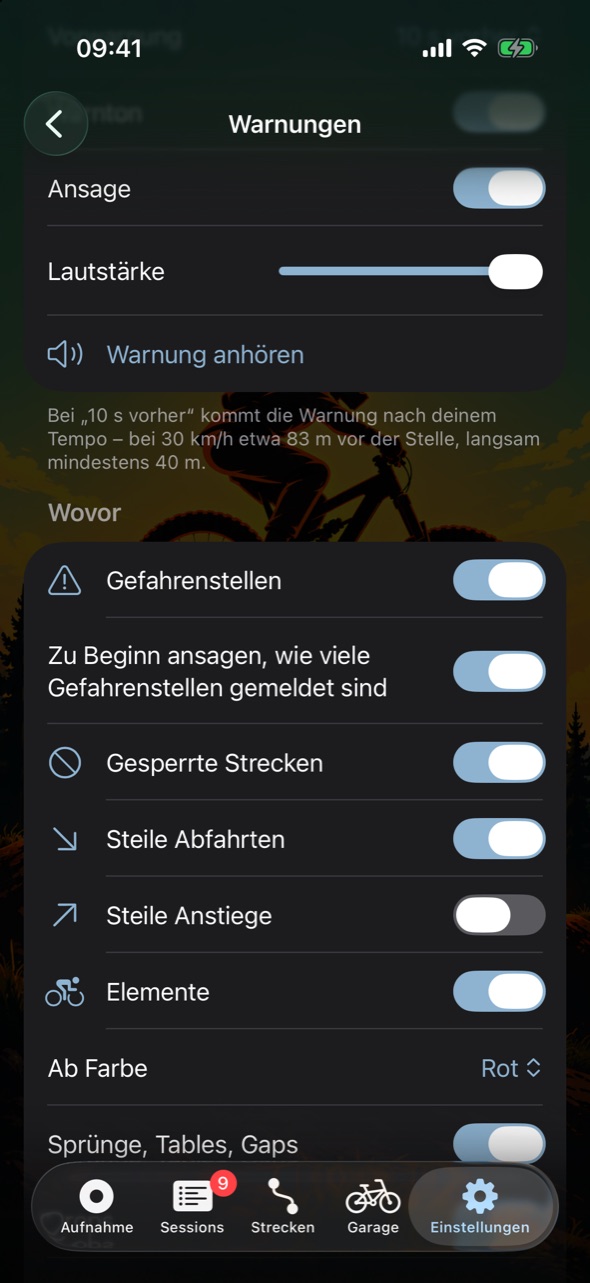
Fährst du auf einer bekannten Strecke auf eine gemeldete Gefahrenstelle zu, sagt SendLab es dir rechtzeitig – per Ton und Ansage am Smartphone, am iPhone auf Wunsch mit kräftigem Tippen an der Apple Watch. Das Handy bleibt in der Tasche, dein Blick auf dem Trail. Am Bike wird nichts montiert, kein Navi, kein Display.
When you ride towards a reported hazard on a known trail, SendLab tells you in good time – with a tone and announcement on your phone, and on iPhone a firm tap on your Apple Watch if you like. Your phone stays in your pocket, your eyes stay on the trail. Nothing is mounted on the bike – no navigation device, no display.
- Wovor du willst: Gefahrenstellen wie Baum im Weg, Auswaschung oder Matsch, gesperrte Strecken, steile Abfahrten und Anstiege, Sprünge und Drops ab einer Farbe.
- Rechtzeitig: 5 bis 30 Sekunden vorher, nach deinem Tempo – nur in Fahrtrichtung und je Stelle einmal pro Durchfahrt.
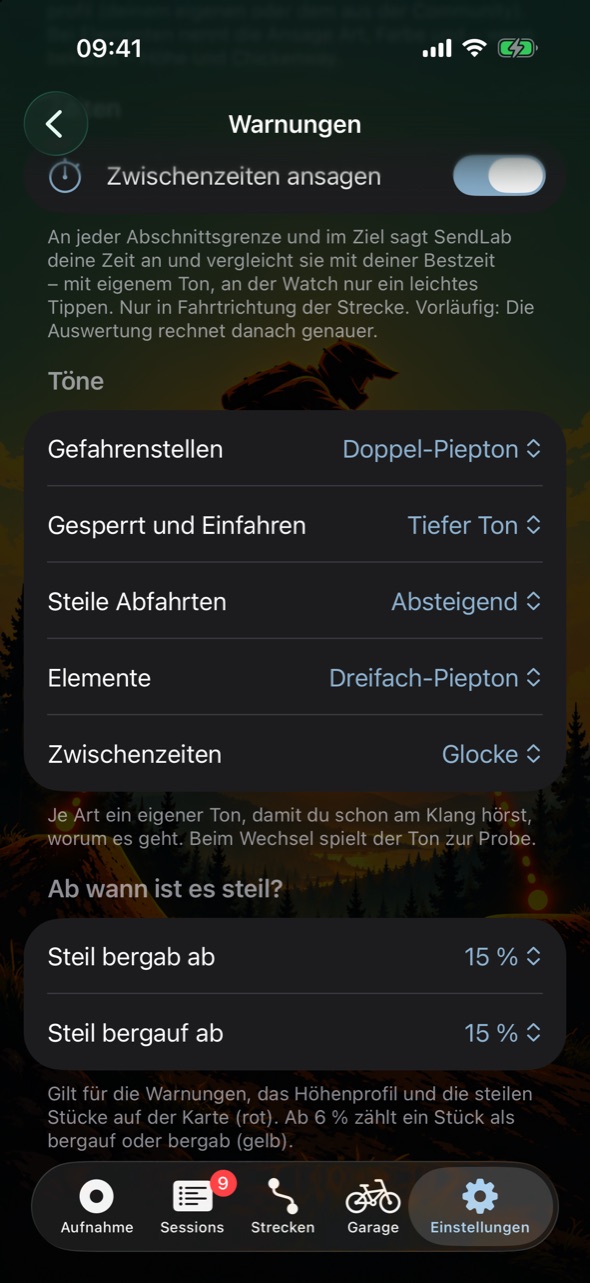
- Am Klang erkennbar: jede Art mit eigenem Ton; beim Einfahren sagt SendLab, wie viele Stellen gemeldet sind.
- Auf Zeit: auf Wunsch Zwischenzeiten an jeder Abschnittsgrenze – mit dem Vergleich zu deiner Bestzeit.
- Von der Community aktuell gehalten: Stellen werden gemeldet, mit „Noch da“ bestätigt und mit „Beseitigt“ abgeräumt.
- What you choose: hazards like a fallen tree, washout or mud, closed trails, steep descents and climbs, jumps and drops from a chosen colour.
- In good time: 5 to 30 seconds ahead, based on your speed – only in your direction of travel and once per spot on each run.
- Recognisable by sound: every kind has its own tone; when you enter a trail, SendLab tells you how many spots are reported.
- On the clock: split times at every section boundary if you like – compared with your best.
- Kept up to date by the community: spots are reported, confirmed with “Still there” and cleared with “Cleared”.
Ehrlich gesagt: SendLab warnt nur vor Stellen, die bekannt sind. Keine Warnung heißt nicht, dass die Strecke sicher ist – fahr immer auf Sicht. Die Warnungen rechnet das Smartphone; eine gekoppelte Apple Watch tippt mit.
To be clear: SendLab only warns about spots it knows. No warning does not mean the trail is safe – always ride within sight. Your phone does the calculation; a paired Apple Watch taps along.


Was SendLab heute kann
What SendLab does today
Stand der Beta. Sprunghöhe und -weite sowie die Tretleistung sind Schätzwerte und in der App so gekennzeichnet; Abfahrten und Landungs-Score sind vorläufig.
State of the beta. Jump height and distance as well as pedalling power are estimates and marked as such in the app; descents and the landing score are preliminary.
Aufnehmen
Recording
- Smartphone in der Tasche: iPhone oder Android-Handy in die Hosentasche, fertig.
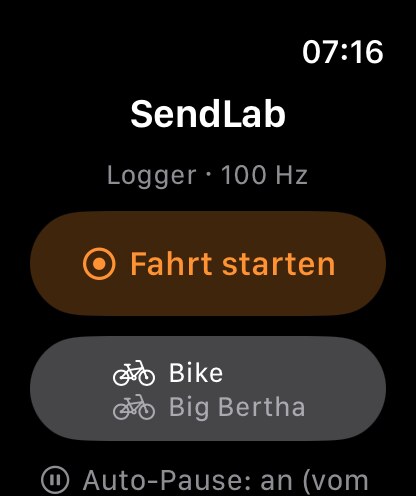
- Mit Apple Watch: am iPhone wahlweise nur die Watch oder beide zusammen.
- Gekoppelt: Start, Marker und Stopp gelten auf iPhone und Watch zugleich.
- Live-Werte: Sprünge, Anlieger, Abfahrten, Höhenmeter und Trittfrequenz schon während der Fahrt.
- Auto-Pause: erkennt Stehen und Weiterfahren von selbst.
- Sperrbildschirm: Fahrzeit und Marker-Knopf ohne Entsperren, am iPhone auch in der Dynamic Island.
- Marker: eine Stelle per Knopf merken und später beschriften.
- Warnungen: Ton und Ansage (am iPhone auch Tippen an der Watch) vor gemeldeten Gefahrenstellen, gesperrten Strecken, steilen Stücken oder Elementen ab einer Farbe – 5 bis 30 Sekunden vorher, je Art mit eigenem Ton, auf Wunsch mit Zwischenzeiten. Gewarnt wird nur vor Bekanntem. Mehr dazu
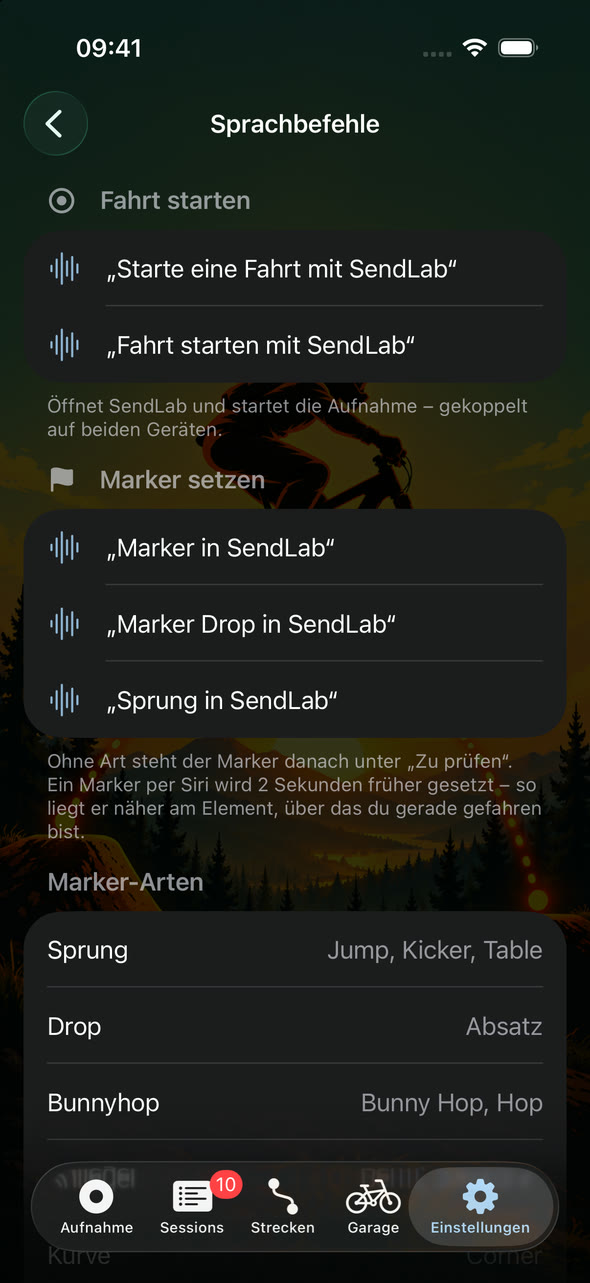
- Per Sprachbefehl: „Starte eine Fahrt mit SendLab“, „Drop in SendLab“, „Stoppe die Fahrt in SendLab“ – ohne Hände, per Siri (auch an der Watch) oder Google Assistant.
- Phone in your pocket: put your iPhone or Android phone in your pocket, done.
- With Apple Watch: with an iPhone, the Watch alone or both together.
- Paired: start, markers and stop apply to iPhone and Watch at once.
- Live values: jumps, berms, descents, elevation gain and cadence while you ride.
- Auto-pause: detects stopping and moving on by itself.
- Lock screen: riding time and the marker button without unlocking, on iPhone in the Dynamic Island too.
- Markers: remember a spot with one tap and label it later.
- Warnings: tone and announcement (on iPhone also a tap on the Watch) before reported hazards, closed trails, steep stretches or features from a chosen colour – 5 to 30 seconds ahead, each kind with its own tone, split times if you like. SendLab only warns about what it knows. More
- By voice: “Start a ride with SendLab”, “Drop in SendLab”, “Stop the ride in SendLab” – hands-free, with Siri (on the Watch too) or Google Assistant.
Erkennen
Detection
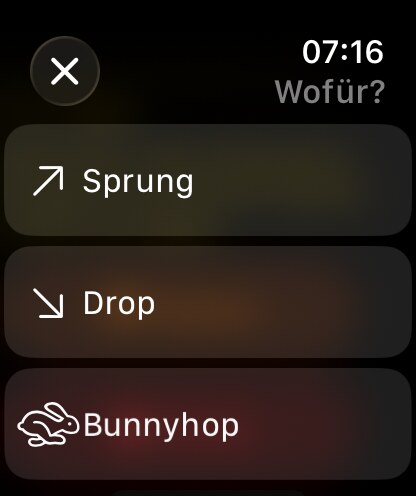
- Sprünge und Drops: Airtime gemessen, Höhe und Weite geschätzt.
- Tricks: 360, Backflip, Tailwhip, Superman … am Sprung markieren und zählen – über 50 aus der Dirt-Szene, eigene dazu.
- Kurven und Anlieger: mit berechneter Schräglage.
- Uphill: Anstiege und Höhenmeter aus Barometer und GPS.
- Pumptrack: Runden, Rundenzeiten und beste Runde.
- Treten: Trittfrequenz und geschätzte Leistung – ohne Sensor am Bike.
- Bestwerte: höchster und weitester Sprung, längster Drop, Höchsttempo, g-Kraft.
- Jumps and drops: airtime measured, height and distance estimated.
- Tricks: mark and count 360s, backflips, tailwhips, supermans … on your jumps – more than 50 dirt tricks, plus your own.
- Corners and berms: with calculated lean angle.
- Climbs: ascents and elevation gain from barometer and GPS.
- Pump track: laps, lap times and best lap.
- Pedalling: cadence and estimated power – without a sensor on the bike.
- Personal bests: highest and longest jump, longest drop, top speed, g-force.
Auswerten
Review
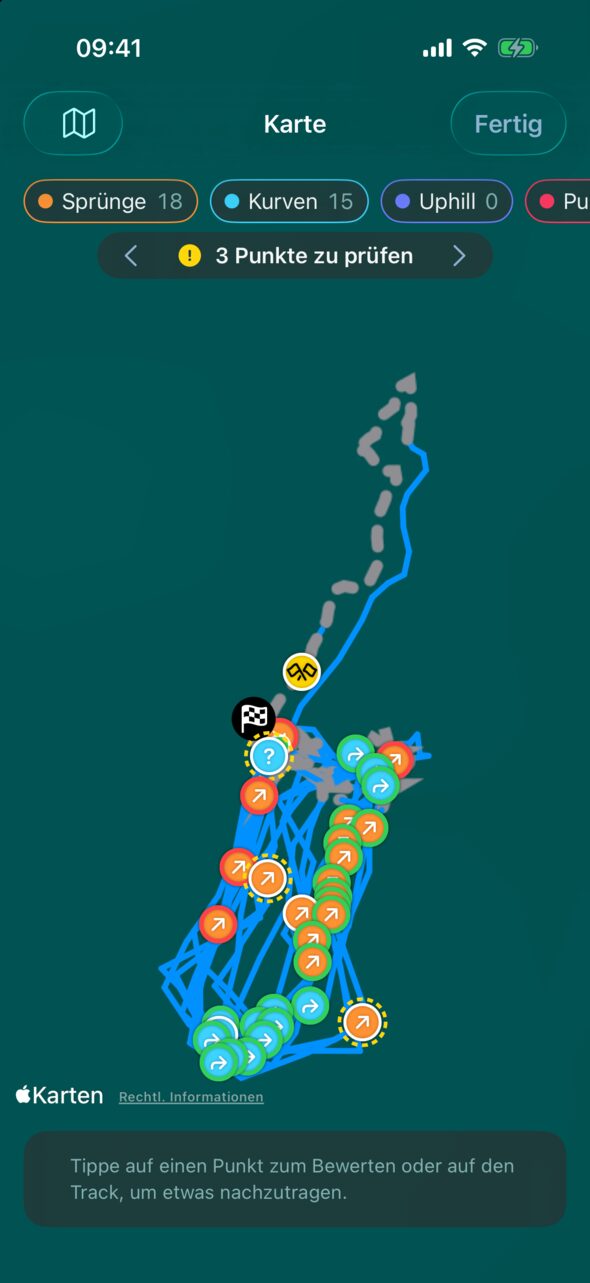
- Karte: jeder Treffer an seiner Stelle auf deinem Track.
- Diagramme: je Kategorie, mit Suchen und Blättern.
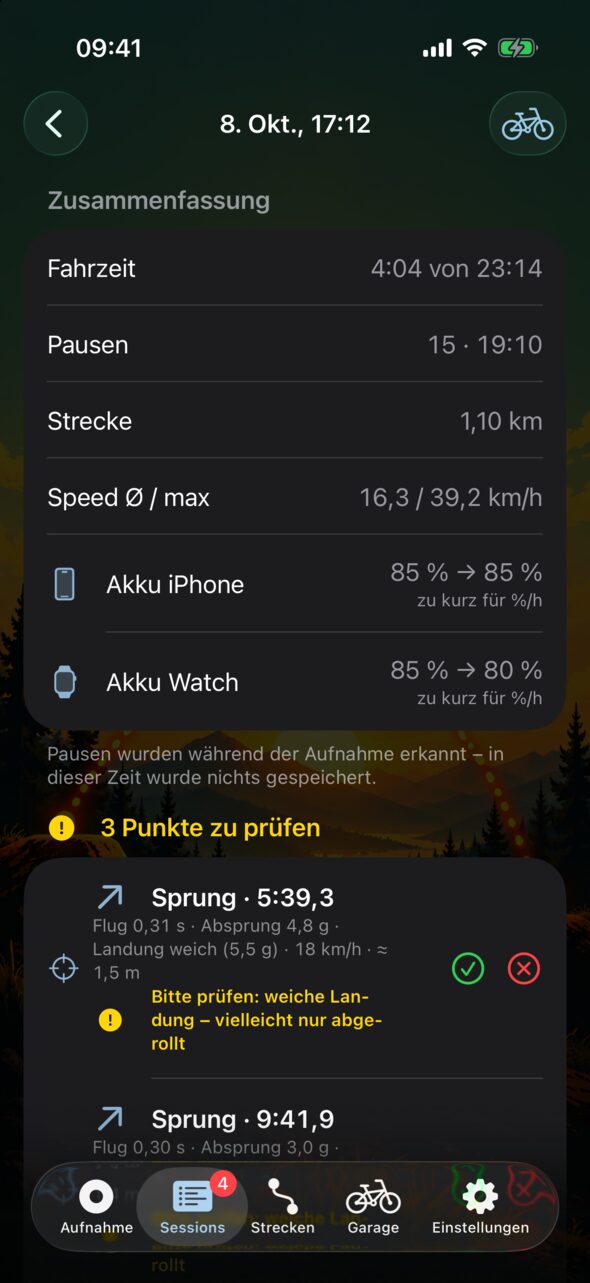
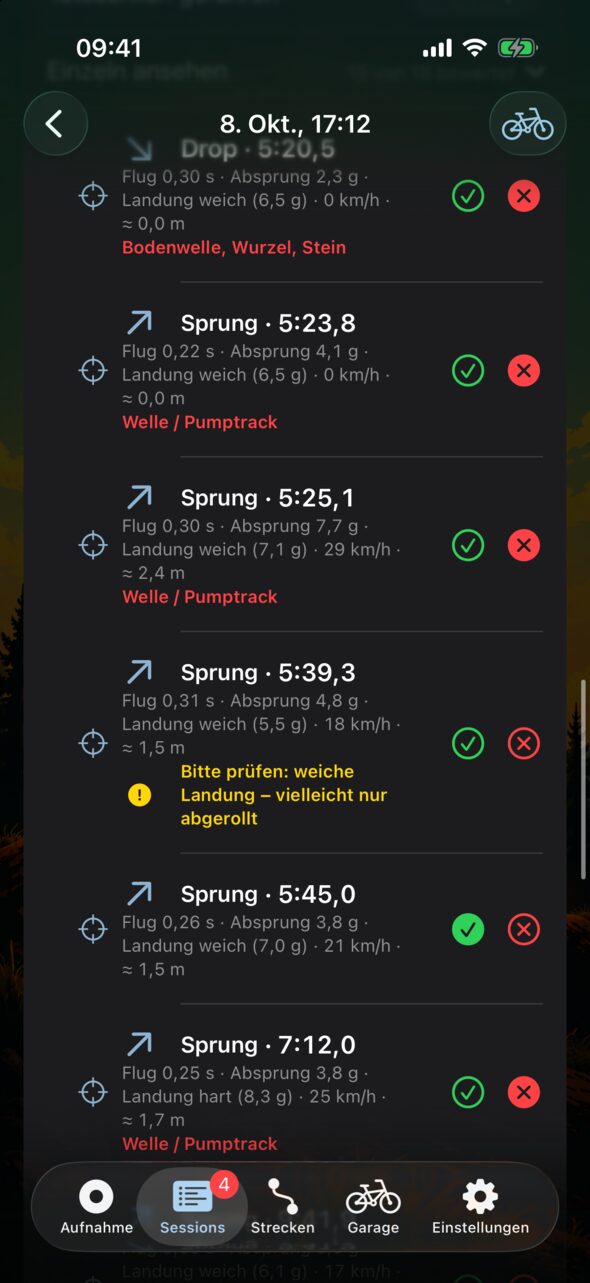
- Bewerten: Treffer bestätigen, verwerfen oder Verpasstes nachtragen.
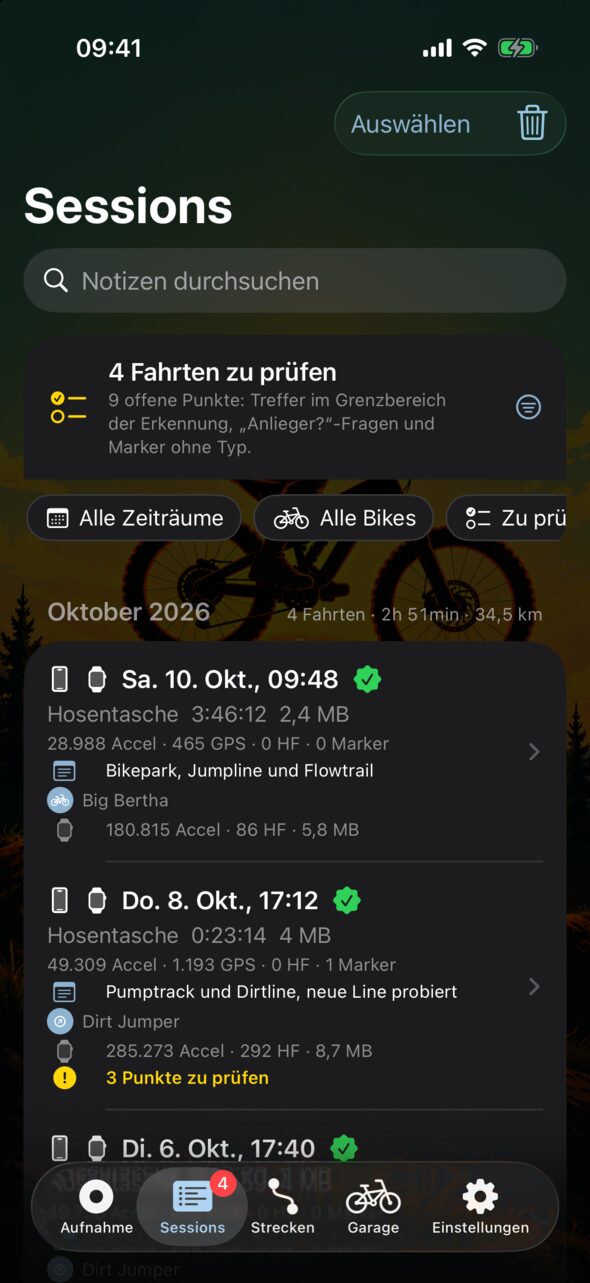
- „Zu prüfen“: unsichere Treffer gesammelt an einer Stelle.
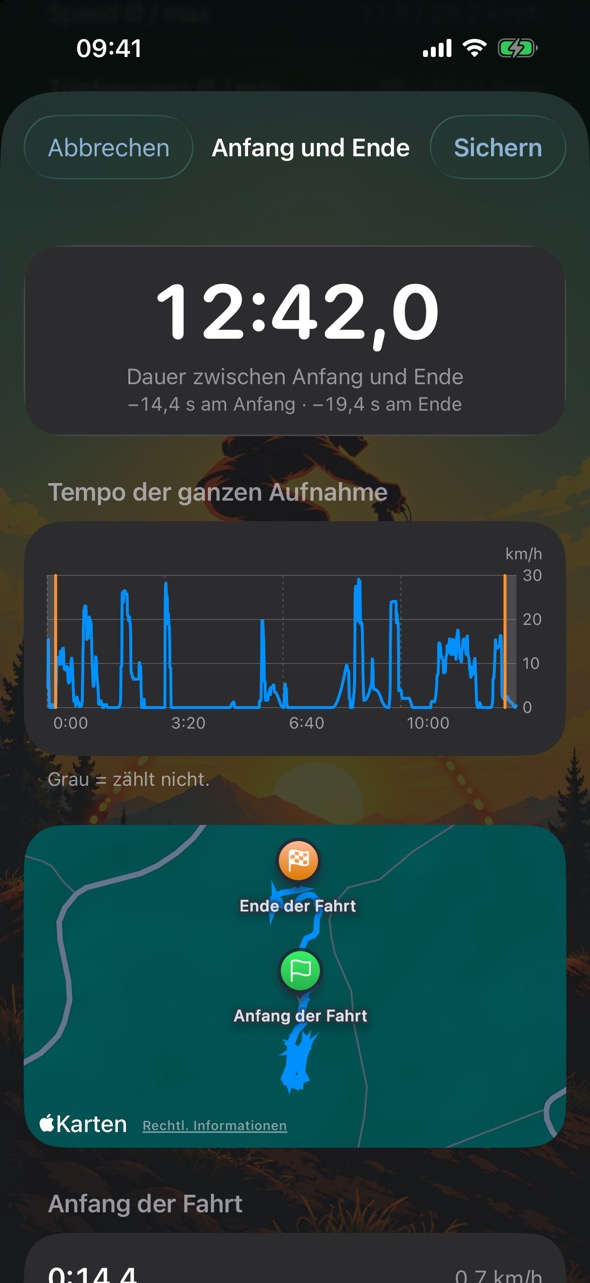
- Genaue Fahrzeit für Training auf Zeit: Start und Stopp per Sprachbefehl oder Uhr kosten Sekunden – schneide Anfang und Ende auf die Zehntelsekunde zu. SendLab schlägt beides aus dem GPS-Tempo vor, auf Wunsch bei jeder neuen Fahrt automatisch.
- Sessions: alle Fahrten mit Filter und Suche in Notizen.
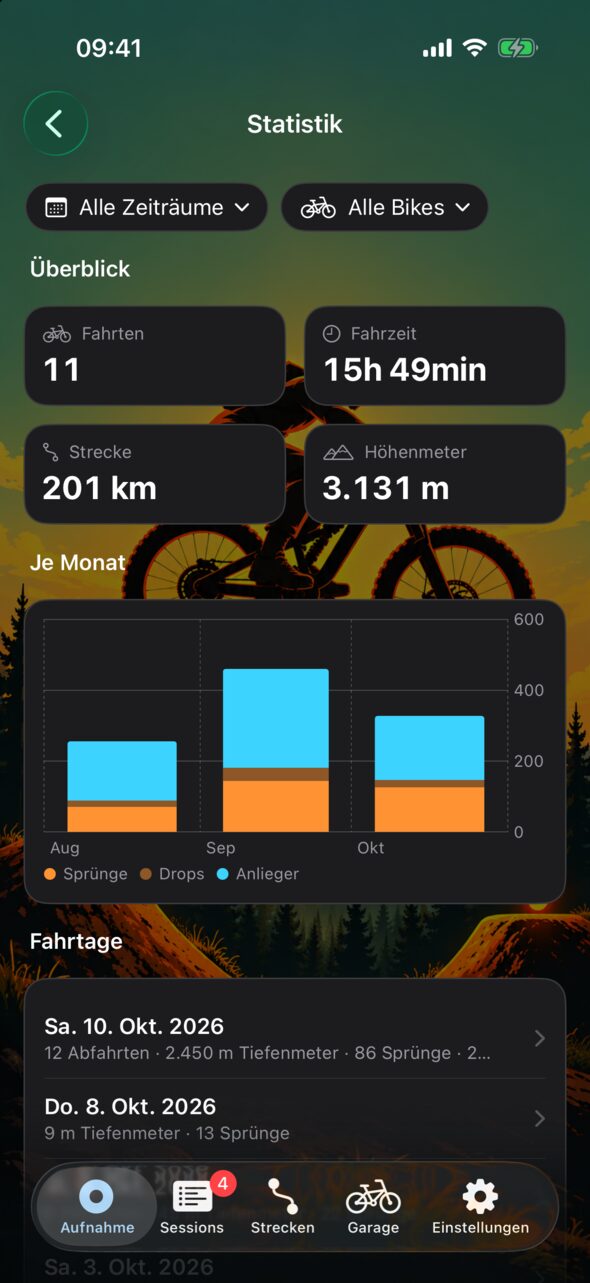
- Statistik: Sprünge, Drops, Anlieger und Landungen im Detail – nach Zeitraum, Bike oder Teil.
- „Wo hatte ich …?“: längste Airtime, höchster Sprung, meiste Sprünge – deine zehn besten Fahrten je Frage, ein Tipp öffnet die Fahrt genau an der Stelle.
- Meine Strecken: alle gefahrenen Strecken, Bikeparks und Pumptracks mit Durchfahrten, Bestzeit und der meisten Airtime.
- Map: every hit at its place on your track.
- Charts: per category, with search and paging.
- Rate: confirm or reject hits, or add what was missed.
- “To review”: uncertain hits collected in one place.
- Exact riding time for timed training: starting and stopping by voice or on the watch costs seconds – trim start and end to the tenth of a second. SendLab suggests both from GPS speed, automatically for every new ride if you like.
- Sessions: all rides with filters and search in notes.
- Statistics: jumps, drops, berms and landings in detail – by period, bike or part.
- “Where did I …?”: longest airtime, highest jump, most jumps – your ten best rides per question; one tap opens the ride right at that spot.
- My trails: every trail, bike park and pump track you’ve ridden, with runs, best time and most airtime.
Bikepark und Training
Bike park and training
- Abfahrten: Runs werden von selbst gezählt – mit Dauer, Tiefenmetern, Höchsttempo und Sprüngen je Abfahrt.
- Tagesübersicht: alle Fahrten eines Tages zusammen, etwa „12 Abfahrten · 4.300 Tiefenmeter · 38 Sprünge“.
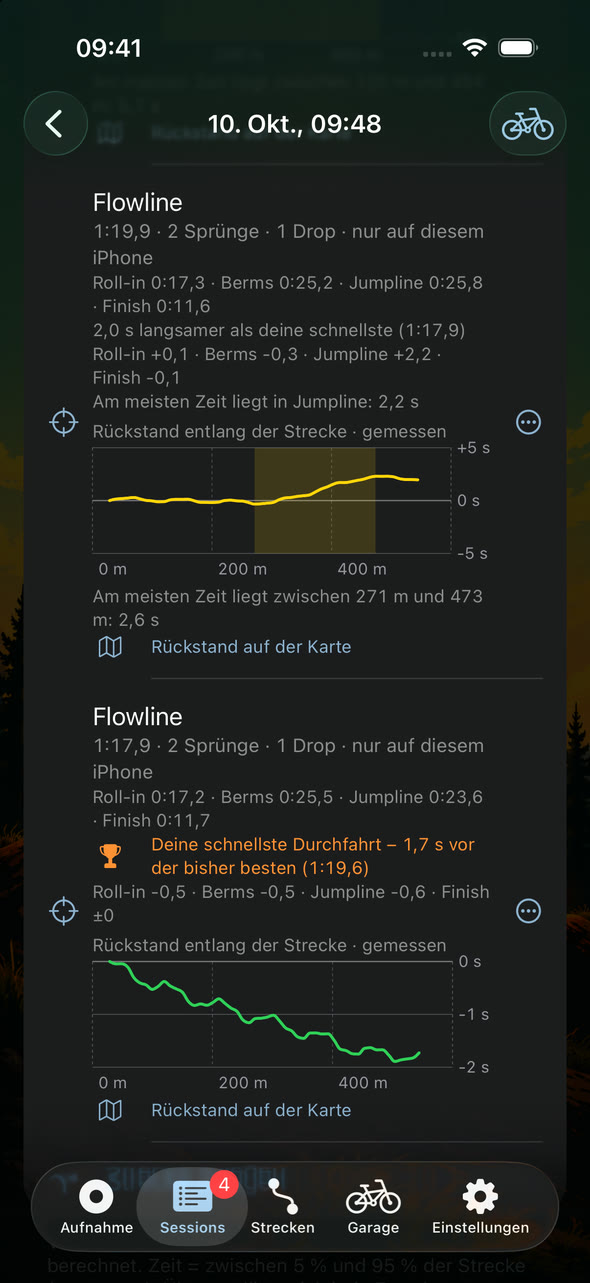
- Run-Vergleich: jede Durchfahrt gegen deine schnellste – gesamt und je Abschnitt.
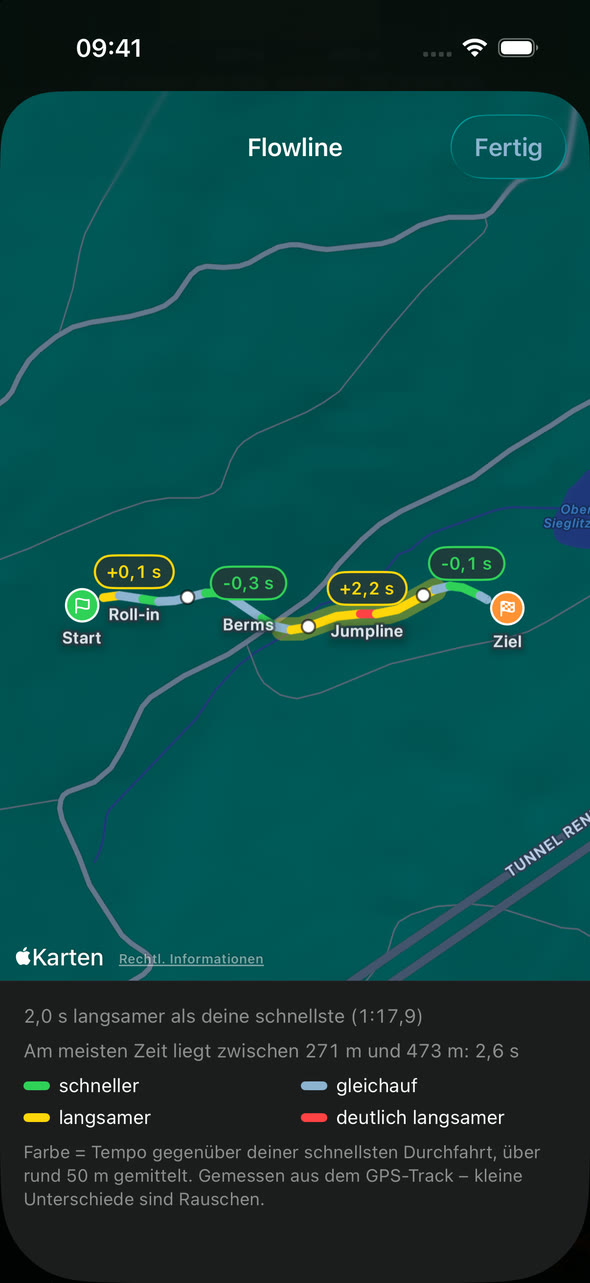
- Wo du Zeit verlierst: dein Rückstand entlang der Strecke als Diagramm und farbig auf der Karte.
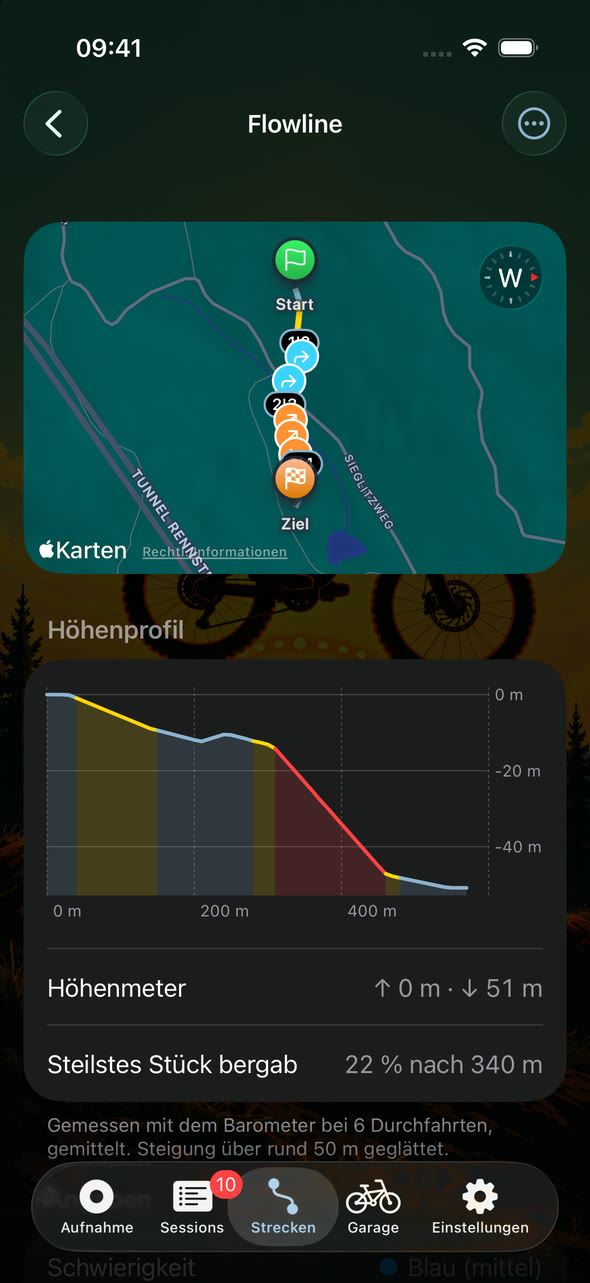
- Höhenprofil: wo es steil rauf und runter geht – aus deinen Durchfahrten und, wenn du magst, mit anderen geteilt.
- Landungs-Score: weich, hart oder sehr hart – gemessen je Landung.
- Descents: runs are counted automatically – with duration, vertical drop, top speed and jumps per descent.
- Day summary: all rides of a day together, such as “12 descents · 4,300 m vertical · 38 jumps”.
- Run comparison: every run against your fastest – overall and per section.
- Where you lose time: your gap along the trail as a chart and colour-coded on the map.
- Elevation profile: where it gets steep up and down – from your runs and, if you like, shared with others.
- Landing score: soft, hard or very hard – measured for every landing.
Strecken
Trails
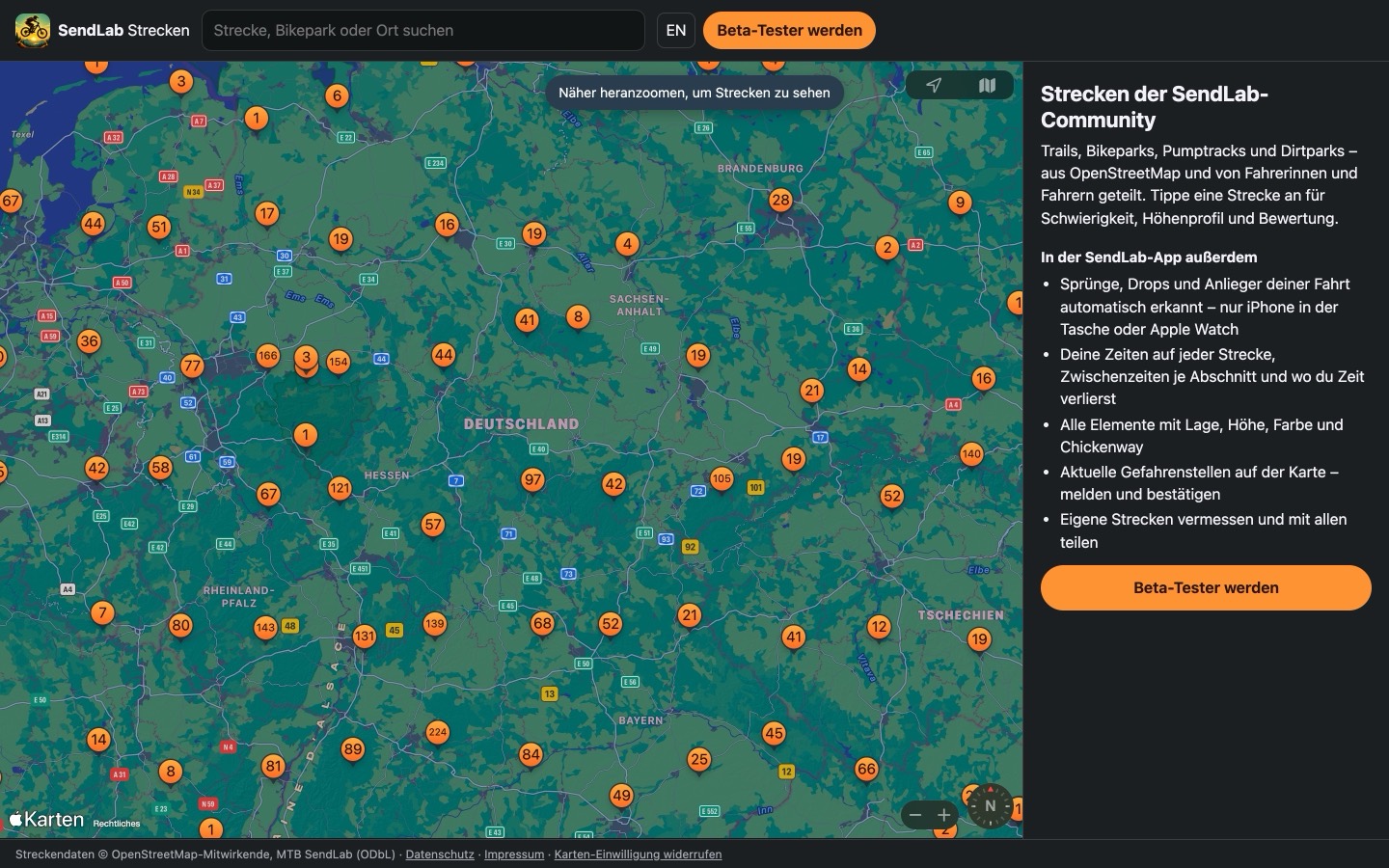
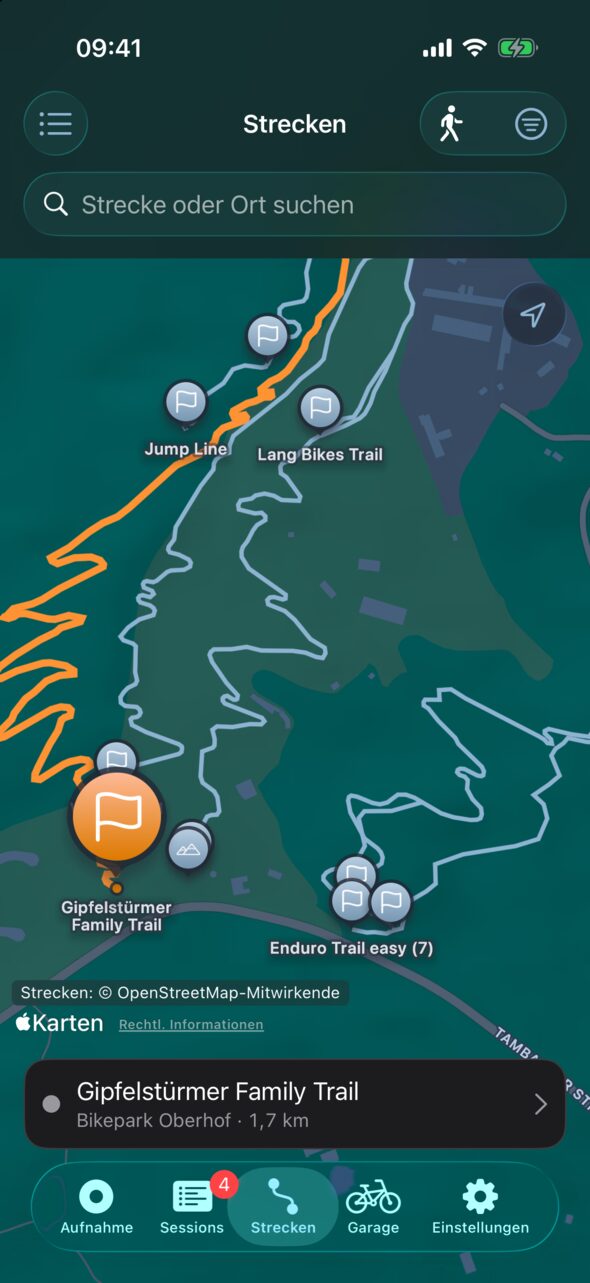
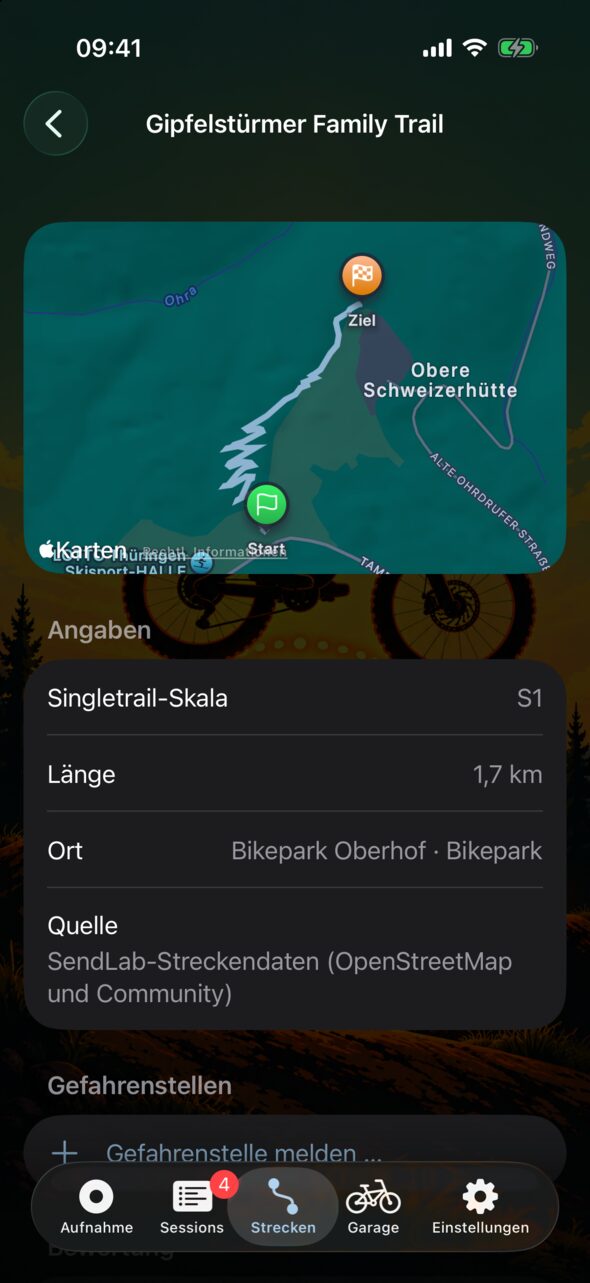
- Karte und Suche: Trails, Bikeparks, Pumptracks und Dirtparks aus OpenStreetMap und von der Community.
- Zeitnahme: Durchfahrten werden von selbst zugeordnet – mit Bestzeit, Abschnitten und Zwischenzeiten.
- Von oben nach unten: Karten von Fahrten und Strecken liegen so, dass der Berg oben ist und es nach unten geht.
- Eigene Strecken: aus einer Fahrt anlegen oder zu Fuß vermessen, mit Sprüngen, Drops, Anliegern und Abschnitten.
- Favoriten: Lieblingsstrecken und Bikeparks merken – sie stehen in der Liste immer oben.
- Fürs Navi: jede Strecke als GPX- oder FIT-Datei mit Elementen und Gefahrenstellen – Garmin und Wahoo warnen unterwegs vor den Stellen.
- Teilen: freiwillig, jede Strecke wird vor der Freigabe geprüft.
- Elemente mit Angaben: Größe, Höhe, Landung, Farbe wie auf dem Schild und Chickenway – an der Strecke oder direkt aus deiner Fahrt.
- Start und Ziel: Fahnen zeigen, in welche Richtung eine Strecke gefahren wird – aus den tatsächlich gefahrenen Durchfahrten.
- Mitmachen: bewerten, Gefahrenstellen melden, Änderungen vorschlagen. Nach jeder Fahrt zeigt SendLab, wo du helfen kannst: fehlendes Höhenprofil, Sprünge ohne Element, Abfahrten, die noch keine Strecke sind.
- Map and search: trails, bike parks, pump tracks and dirt parks from OpenStreetMap and the community.
- Timing: runs are matched automatically – with best time, sections and split times.
- Top to bottom: maps of rides and trails are turned so the mountain is at the top and the trail runs downwards.
- Your own trails: create them from a ride or survey them on foot, with jumps, drops, berms and sections.
- Favourites: keep your favourite trails and bike parks – they always stay at the top of the list.
- For your navigation device: any trail as a GPX or FIT file with features and hazards – Garmin and Wahoo warn you about them along the way.
- Sharing: optional, every trail is checked before it is published.
- Features with details: size, height, landing, colour as on the sign and chicken line – on the trail or straight from your ride.
- Start and finish: flags show which way a trail is ridden – based on the runs actually ridden.
- Contribute: rate, report hazards, suggest changes. After every ride SendLab shows where you can help: a missing elevation profile, jumps without a feature, descents that are not a trail yet.
Fortschritt
Progress
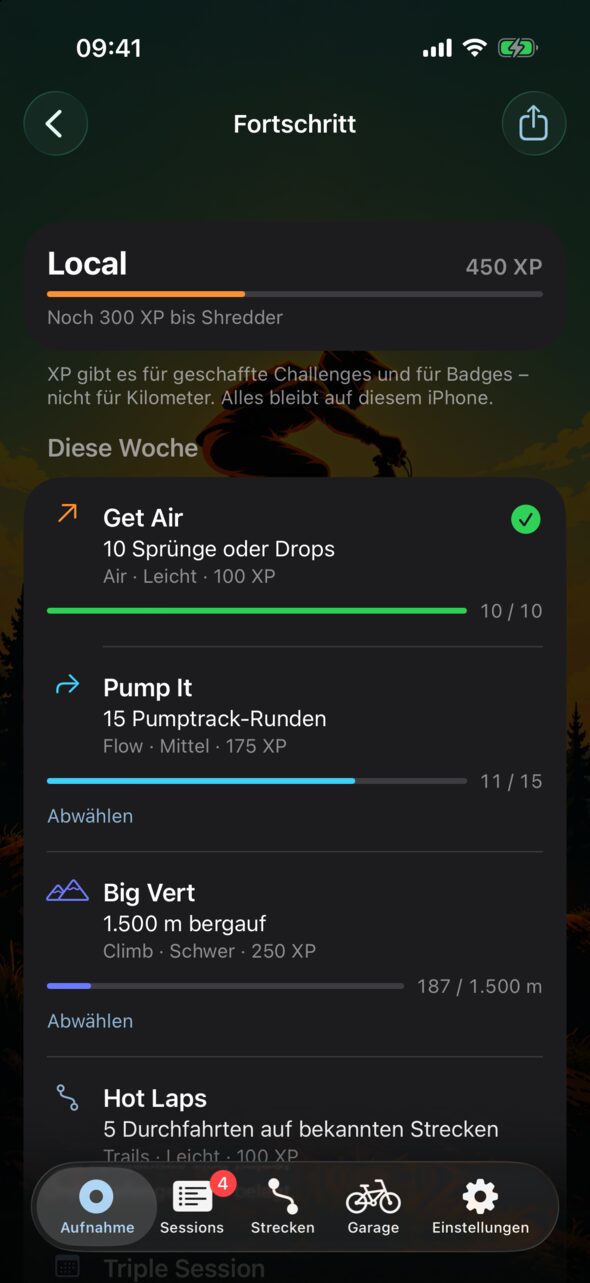
- Ränge: vom Rookie aufwärts, mit Erfahrungspunkten.
- Challenges: jede Woche neue, bis zu drei gleichzeitig.
- Badges: für Meilensteine über alle Fahrten.
- Unterwegs sichtbar: deine Challenge mit Stand auf Sperrbildschirm und Watch.
- Fair: gezählt werden Anzahl, Tage und Höhenmeter – nie Tempo oder Höhe.
- Ranks: from Rookie upwards, with experience points.
- Challenges: new ones every week, up to three at a time.
- Badges: for milestones across all your rides.
- Visible on the go: your challenge and its progress on the Lock Screen and Watch.
- Fair: what counts is numbers, days and elevation gain – never speed or height.
Gruppen
Groups
- Mit Freunden vergleichen: Gruppe erstellen, per QR-Code, Code oder Link einladen.
- Je Monat: Kilometer, Höhenmeter, Fahrtage, Sprünge und Drops, Challenges und meiste Airtime.
- Je Strecke und Pumptrack: Bestzeit, meiste Airtime, Runden – nur für alle, die dort selbst gefahren sind.
- Du bestimmst: je Gruppe, was die anderen von dir sehen. Nie Tempo, Positionen oder Puls.
- Compare with friends: create a group, invite by QR code, code or link.
- Per month: distance, elevation gain, riding days, jumps and drops, challenges and most airtime.
- Per trail and pump track: best time, most airtime, laps – only for those who rode there themselves.
- You decide: per group, what the others see of you. Never speed, locations or heart rate.
Teilen und Export
Sharing and export
- Meilensteine als Bild: Bestwerte, Rang, Badges und dein Tag – ohne Ort und ohne Namen.
- Strava, Komoot und andere: Fahrt als GPX-Datei übergeben, mit Sprüngen und Drops als Wegpunkte.
- Apple Health und Health Connect: Training mit Route und Höhenmetern, am iPhone auch mit Trittfrequenz.
- Export: jede Fahrt als Datei – wahlweise ohne GPS-Position und Puls.
- Milestones as an image: personal bests, rank, badges and your day – without location or name.
- Strava, Komoot and others: hand over a ride as a GPX file, with jumps and drops as waypoints.
- Apple Health and Health Connect: workout with route and elevation gain, on iPhone with cadence too.
- Export: every ride as a file – optionally without GPS position and heart rate.
Garage
Garage
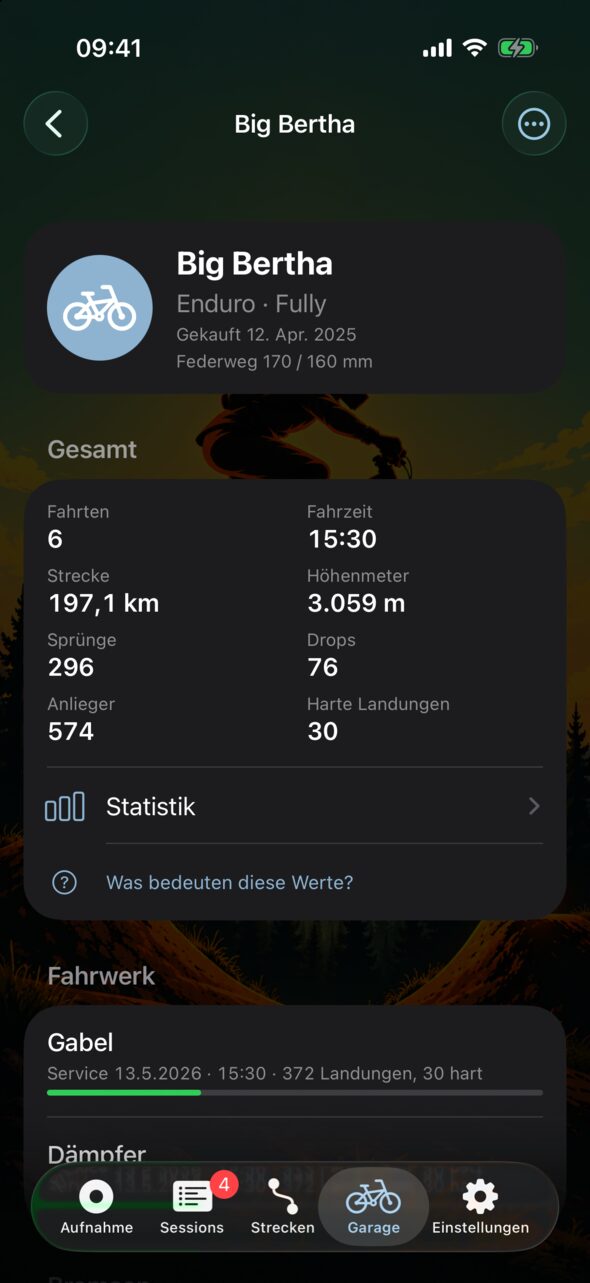
- Bikes: mit Typ, Federung, E-Antrieb und Foto.
- Teile: Einbau, Service-Intervall und Belastung seit dem letzten Service.
- Belastung: Fahrzeit, Strecke, Sprünge und harte Landungen je Teil.
- Je Fahrt wählbar: welches Bike – auch nachträglich und von der Watch aus.
- Auf allen Geräten: Garage, Fahrten und Fortschritt auf Wunsch über dein eigenes iCloud bzw. Google Drive.
- Bikes: with type, suspension, e-drive and photo.
- Parts: installation, service interval and load since the last service.
- Load: riding time, distance, jumps and hard landings per part.
- Per ride: choose the bike – also afterwards and from the Watch.
- On all your devices: garage, rides and progress via your own iCloud or Google Drive, if you like.
Datenschutz
Privacy
- Dein Track bleibt bei dir: Der GPS-Track deiner Fahrten geht nicht an SendLab.
- Teilen nur mit Einwilligung: Korrekturen gehen ohne GPS-Position und ohne Puls hinaus.
- Schutzzonen: was dein Zuhause berührt, wird nie geteilt.
- Kein Konto: keine Anmeldung bei SendLab, keine Werbung, kein Tracking.
- Your track stays with you: the GPS track of your rides is not sent to SendLab.
- Sharing only with consent: corrections leave without GPS position and without heart rate.
- Privacy zones: anything touching your home is never shared.
- No account: no SendLab sign-in, no ads, no tracking.
SendLab läuft auf iPhone (iOS 26) mit Apple Watch (watchOS 26) und auf Android-Smartphones (ab Android 8), auf Deutsch und Englisch.
SendLab runs on iPhone (iOS 26) with Apple Watch (watchOS 26) and on Android phones (Android 8 or later), in German and English.
Alle Strecken auf der Karte – auch im Browser
All trails on the map – in your browser too
Trails, Bikeparks, Pumptracks und Dirtparks aus OpenStreetMap und von der SendLab-Community – mit Schwierigkeit, Höhenprofil, Bewertung und wie viele Sprünge, Drops und Anlieger dich erwarten. Ohne App, direkt im Browser.
Trails, bike parks, pump tracks and dirt parks from OpenStreetMap and the SendLab community – with difficulty, elevation profile, rating and how many jumps, drops and berms await you. No app needed, right in your browser.

SendLab in Zahlen
SendLab in numbers
Die Streckendatenbank, die SendLab beim Erkennen deiner Durchfahrten nutzt, und die Gruppen, in denen gemeinsam gefahren wird – gerade eben vom Server abgerufen.
The trail database SendLab uses to recognise your runs, and the groups riding together – fetched from the server just now.
Länder: Countries:
Je Land
By country
| LandCountry | StreckenTrails | KilometerKilometres | BikeparksBike parks | TrailcenterTrail centres | PumptracksPump tracks | DirtparksDirt parks | SprüngeJumps | DropsDrops | AnliegerBerms |
|---|
Stand: . Streckendaten: © OpenStreetMap-Mitwirkende und die Community von SendLab.As of . Trail data: © OpenStreetMap contributors and the SendLab community.
So sieht SendLab aus
What SendLab looks like
Aus der laufenden Beta, iPhone und Apple Watch. Die Bilder zeigen Beispieldaten.
From the running beta, iPhone and Apple Watch. The images show sample data.

















Was noch kommen soll
What is still to come
Ideen für die Zeit nach der Beta – Reihenfolge und Umfang stehen noch nicht fest.
Ideas for the time after the beta – order and scope are not fixed yet.
- Lifte sicher erkennenHeute schätzt SendLab, was eine Liftfahrt ist. Sie soll verlässlich erkannt werden und nicht mehr als Fahrzeit zählen.
- Reliable lift detectionToday SendLab estimates what a lift ride is. It should be detected reliably and no longer count as riding time.
- BremspunkteWo bremst du vor Kurven und vor Sprüngen – und wo früher als nötig?
- Braking pointsWhere do you brake before corners and jumps – and where earlier than needed?
- Challenges in der GruppeGemeinsame Ziele für deine Gruppe – etwa diesen Monat zusammen 5.000 Höhenmeter.
- Group challengesShared goals for your group – say 5,000 m of climbing together this month.
- Drop-Höhe in MeternHeute zeigt SendLab bei Drops die gemessene Airtime; die Höhe soll folgen, sobald genug Daten da sind.
- Drop height in metresToday SendLab shows the measured airtime for drops; the height will follow once there is enough data.
Was SendLab kostet
What SendLab costs
14 Tage alles ausprobieren – ohne Konto, ohne Zahlungsdaten, ohne dass sich etwas von selbst verlängert.
Try everything for 14 days – no account, no payment details, nothing that renews by itself.
- iPhone im App Store, Android im Beta-TestSendLab für iPhone und Apple Watch gibt es jetzt im App Store. Unter Android läuft noch der Beta-Test; dort gelten die Preise ab dem Start bei Google Play. Beta-Tester bekommen die App kostenlos, ohne Abo (als Tester melden).
- iPhone in the App Store, Android in betaSendLab for iPhone and Apple Watch is now in the App Store. On Android the beta is still running; there the prices apply from the launch on Google Play. Beta testers get the app for free, no subscription (become a tester).
- ProbezeitAb dem ersten Start sind 14 Tage lang alle Funktionen frei.
- TrialFrom the first launch, all features are free for 14 days.
- Danach als Abo2,99 € im Monat oder 24,99 € im Jahr (Preise für Deutschland; in anderen Ländern zeigt die App den dortigen Preis).
- Then a subscription€2.99 per month or €24.99 per year (prices for Germany; in other countries the app shows the local price).
- Ohne AboStatistik, Garage und deine bisherigen Fahrten bleiben, und Fahrten bewerten und Korrekturen teilen kannst du immer. Aufnehmen, Strecken, Warnungen und Gruppen brauchen das Abo.
- Without a subscriptionStatistics, garage and your past rides stay, and you can always review rides and share corrections. Recording, trails, warnings and groups require the subscription.
- Abrechnung und KündigungÜber deinen Apple-Account bzw. dein Google-Konto. Das Abo verlängert sich automatisch und lässt sich dort jederzeit kündigen.
- Billing and cancellingThrough your Apple Account or Google account. The subscription renews automatically and can be cancelled there at any time.
Deine Daten kannst du jederzeit löschen oder exportieren – auch ohne Abo.
You can delete or export your data at any time – even without a subscription.
Beta-Tester gesucht
Beta testers wanted
Du fährst Trails, Bikepark oder Pumptrack? Teste neue Funktionen von SendLab vor allen anderen – auf dem iPhone über TestFlight oder auf Android – und hilf mit, die Erkennung besser zu machen.
You ride trails, bike parks or pump tracks? Test new SendLab features before everyone else – on iPhone via TestFlight or on Android – and help improve the detection.
- Worum es jetzt geht
- Im ersten Beta-Schritt sammeln wir Fahrdaten, um damit die Erkennung zu trainieren.
- Was du tust
- Fahren und danach in der App die erkannten Elemente bewerten oder korrigieren – erst mit deiner Rückmeldung werden die Daten brauchbar.
- Dein Dank
- Wer mithilft, bekommt die App kostenlos. Nach deiner ersten bewerteten Fahrt sichert dir die App einen Platz (500 am iPhone, 200 unter Android). Am iPhone holst du den Code fürs kostenlose Abo direkt in der App, sobald du die Version aus dem App Store nutzt; unter Android schaltet sich die Version aus Google Play nach dem Start dort von selbst frei – beides ohne E-Mail-Adresse.
- What it is about right now
- In the first beta stage we collect ride data to train the detection.
- What you do
- Ride, then rate or correct the detected elements in the app – only your feedback makes the data usable.
- Our thanks
- Everyone who helps gets the app for free. After your first rated ride the app secures you a spot (500 on iPhone, 200 on Android). On iPhone you fetch the code for the free subscription right in the app as soon as you use the App Store version; on Android the Google Play version unlocks by itself once it launches there – no email address needed either way.
iPhone
Jetzt über TestFlight testen Test now via TestFlightAndroid
Zwei Schritte mit deinem Google-Konto: erst der Testergruppe beitreten, dann den Test bei Google Play annehmen und SendLab installieren.
Two steps with your Google account: first join the tester group, then accept the test on Google Play and install SendLab.
- Der Gruppe „sendlab-beta-tester“ beitretenJoin the group “sendlab-beta-tester”
- Test bei Google Play annehmenAccept the test on Google Play
Nimm in beiden Schritten dasselbe Google-Konto wie im Play Store deines Handys. Nach dem Beitritt kann es ein paar Minuten dauern, bis Google Play den Test anzeigt.
Use the same Google account in both steps as in the Play Store on your phone. After joining it can take a few minutes until Google Play shows the test.
Schon dabei? Was du gerade testen kannst und welche Daten uns helfen: Für Beta-Tester.
Already in? What you can test right now and which data helps us: For beta testers.
Fragen zum Beta-Test?Questions about the beta? beta@mtb-sendlab.appKontakt
Contact
Fragen zur App, Hilfe oder eine Rückmeldung:Questions about the app, help or feedback: kontakt@mtb-sendlab.app
Grundeigentümer, Forst, Betreiber: Soll eine Strecke oder ein Ort nicht in SendLab erscheinen, schreib uns mit Namen und Lage an kontakt@mtb-sendlab.app – wir nehmen sie aus der Streckendatenbank.
Landowners, forestry, operators: If a trail or place should not appear in SendLab, write to us with its name and location at kontakt@mtb-sendlab.app – we will take it out of the trail database.